KCDC Conference 2021 – Consuming Endangered Pachyderms

Slides

Blogs on related topics

Mental Model Minute: Seven Levels of Authority

We are all growing and learning as professionals in a collaborative workspace. It can be helpful to take a step back and look at different models of individual and team behavior. A “mental model minute” takes just a moment to describe a different view on how to perform or interact better that we can react…

The Next Right Thing

You’ve seen Frozen 2, right?  I mean, if your household is anything like mine, it’s playing on repeat in the background as children scramble, color, and fight.  Admittedly, I have only sat and watched it end to end once.  Still, there is one part of the movie that stick out to me and, I think,…

Build Things People Want

When I started at my current company, the mandate I was given by the developers was to help them build things people want.  It is something I have heard over and over again from developers throughout my career.  And frankly, it’s a goal that the organization and the developers should be aligned on.  The business…

Also check out other presentations.

That Conference – Build Things People Want

This week I am presenting at That Conference on Feedback Loops and building things people want. Wanted to roll up a few resources and point out some more topics for people interested in this topic.

Slides


Blogs on this Topic

KCDC 2022 – Build Things People Want

Super excited to be presenting at KCDC about building things people want. This is one of my favorite topics and it provides a lot of opportunity to dig deeper into topics. Slides Blogs on This Topic Videos on This Topic

Customer Intimacy and Segmentation

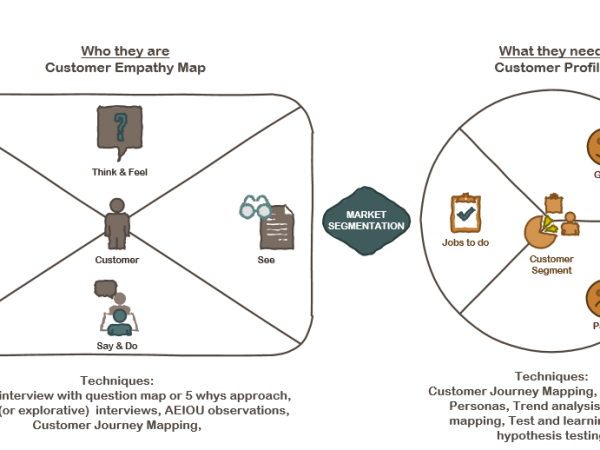
The biggest mistake young companies make is trying to sell everything to everyone.  It is impossible to get a clear value proposition or distinct competitive advantage without a targeted market segment.  The biggest mistake older companies make is not realizing when the market has changed and that segment is consolidating, shrinking, or shifting.  Both of…

Formulating Problem Statements

This morning, my children were arguing over spoons.  At breakfast it is my 5-year-old Finley’s job to get out the silverware for herself and her sister.  My Thalia, in the meantime, is just about to turn 3 and is fully feeling her control issues.  Every morning they use these particular baby spoons to eat their…

Finding the First Thin Cut

My goal in any product development effort is to get an iteration in front of users as quickly as possible so I can see real users interact with it and respond to their emerging needs. The quicker I can build that first MVP, the sooner the feedback loop of engaging with users can take over.…


Videos on This Topic

Formulating Problem Statements
Hypothesis Testing

More Videos on my Presentations Page

Remote Work is Here to Stay

As operations leaders across the world stumble and struggle to figure out their “return to work” strategies, I have been reflecting on the nature of the fundamentally collaborative work we do in software development and what it will look like in this new world.  I don’t know what the post-Covid world of work will look like.  But I do know that it will be different and leaders who just try to rest to how things were a year ago are going to be in shock as their employees chose to move to more flexible companies.  So, what do we need to think about as we balance collaboration with employee desire?

Remote work is a benefit, revoking it will have consequences.

While most companies didn’t move into remote work a year plus ago because they were trying to add an employee benefit, that is, in fact, what they did.  Now that employees have gotten an opportunity to work remotely, and for the most part successfully, many will view any change to the remote work policy as the removal of a benefit.  In a lot of workplaces, the right to work remotely was previously reserved for special situations where an employee may want to move across country and the employer desperately wanted to retain that employee.  Now you have the same situation but in reverse.  Employees that choice to make a blanket policy that requires all employees to return to the office, even if only a few days a week, will see turn over.  The presentation of how this return to the office is conducted, and how much agency the employees have in their return, will also affect retention.  As part of your plan, consider retention goals along side other goals like productivity, collaboration, and team unity.  Figure out what you want to measure and what your most important goals are.  For some employees, the ability for managers to be able to work with their staff in person may be a worthwhile tradeoff for significant turn over.  However, just as furloughs, pay reductions, or other benefit reductions will result in employee exits, the same will happen here.  Also remember that the employees that leave first are most often the most talented as they can most easily find other work.

Employee opinions matter

Along that same line, asking employees what they want should be part of your policy strategy.  Rolling out a new return to work policy without conducting a visible employee feedback process will result in lash back, no matter if the employees agree with the ultimate policy or not.  Especially coming at the end of a year where everyone has lost a sense of control in their own life, most people will not take kindly to being told what they will do instead of being consulted in their own destiny.

Also consider that each employee has different goals, work/life balance needs, and work styles that will contribute to their optimal workplace environment.  There is no one size fits all approach.  Policies that declare a certain job family or group of people based on location of their homes will be required to work in the office while giving blanket approval to continue remote work for another group will be seen as unfair or ill considered.  Yes, it is much easier to make policies that apply across the board.  However, leaving room for manager discretion, especially for high performing individuals, is essential.  This isn’t just a matter of retention; it is also a matter of inclusion and diversity.  Different people work, process information, have interactions in different ways.  There differences between people is part of what allows serendipity to happen, not just being in the same place at the same time.  Honor those differences by honoring individual needs.

Identify tradeoffs based on work style and actively mitigate

There are pros and cons to each interaction style.  Fully remote individuals need to work hard to collaborate and consciously build relationships that may naturally develop by bumping into someone at the watercooler.  In office individuals can find it harder to concentrate or to find quiet to work in and be easily distracted by the talk around the watercooler.  Everyone needs to find ways to balance between time at work and time at home regardless of if they are physically in the office or not.  It is overly simplistic to say that people in the office have better connections to their coworkers or people who work remotely focus better.  Everything takes work and it is up to both the individuals and the organization to help employees perform their best regardless of where they work.  Collaboration tools and video helps remote employees feel more engaged.  Sound buffeting and focused spaces help in office employees feel like they can get “heads down time”.

In addition, hiring a remote workforce allows you access to a larger pool of candidates, no matter where your office may be located.

Remote friendly is now the standard

Regardless of your return to the office plan, more likely than not you will now have employees who will remain full time remote.  There was a general trend towards remote friendliness before Covid and now, as with all things in the last year, that trend has accelerated.  This means that a remote friendly office is no longer an option.  You must put cameras in your conference rooms, include collaboration tools in your budget, and be prepared to help manager navigate productivity discussions with employees they can’t see typing on their computers.  However, remote friendliness is more than just how you make sure your remote team members can be part of conversations.  It is also making sure all employees, regardless of where they work, feel like they are part of the team.  Time has to be taken to think about these things.

A Day in the Life

I was recently discussing with a colleague the two distinct parts of my job: Engineering Team Manager and Software Product Director. In one half I am responsible for the cohesion of the team, supporting and growing team members, and employee exits. In the other half I am responsible for the cohesion of the product vision, support and growing the product features, and retaining clients.

I see a lot of overlap in the work I do in each half but often these two sets of responsibilities don’t come together in a single position. My colleague suggested that I outline a day in the life in this kind of position and see if it resonates with anyone else. And so this is my attempt to do just that.

8:00 Get situated

Review any emails or Slack messages from yesterday that need responded to. Make a list of to dos or promises in progress. Prep anything needed for meetings for the day

8:30 One-on-one

Talk with a team member about their current work assignment and where they are struggling with some technical skills. We set up a mentorship plan with one of the more senior members of the team. Then we transition to talking about their long term growth plans and check to make sure the current work assignment matches with their development goals.

9:00 Standups

Three teams, three standups, three completely different conversations and engagement styles. One team jokes about upcoming lunch plans and then quickly walks through the board top to bottom. One team stops at the first story and get going on a technical debate on approach before I ask if we can take that to our planning. One team goes member by member and seems a little disengaged. I make a note to circle back on the last time to see what team building we can do.

10:00 Design Meeting in Planning

After setting it aside in standup, the team wants to immediately get into a debate on approach in planning. We pull out the digital white board and I start drawing out what I am hearing them say as the debate continues. Soon everyone on the team is drawing out ideas as well and we are settling into a rhythm of collaborative problem solving. I quickly review the market goals of the product we are developing and remind the team where it fits into our overall architectural goals as the discussion goes off into a debate that is not necessary for the immediate problem. Once we all agree on the approach, we turn it into stories and get into planning for the week.

11:30 Lunch

12:00 Re-situate

Look through any emails and Slack messages that came during planning to make sure that nothing needs my immediate attention. Add things that can wait to my to do list, respond to things that can be dealt with immediately. Fortunately, not very much needs urgent attention so I look down my list and calendar to find the next most valuable work.

12:30 Roadmap Presentation Prep

Given the relative quiet of the day, I find some focus time to work on the roadmap presentation I am recording later this week for clients. Put together screenshots of recently released features and outline how I want to describe what is coming next in our products. Review the project plans on the current products against our actual sprint work to ensure I will not be making promises we can’t deliver on. Send an update to the Exec sponsor of one of the products to tell them we are releasing a feature soon they will be especially interested in.

2:00 Open Office Hours

Open my Slack channel for Ask an Engineer and wait for a client facing support staff to ask a question. I quickly end up explaining how the object relationships of some data are impacted the way the information is showing up on the page to one person. Then I get into a discussion of our roll out of a new feature to clients with another.

3:00 Respond to Client Issue

Out of Open Office Hours I have one take away to work through a client issue with the development team. A client has expressed concern with how one of the products is working. I work through the client concern with the team and draft a message back to the client explaining our solution to the concern.

3:30 Huddle on a Proposal

The Sales Director has a prospect with a unique use case for one of our products we wants to talk through with me. We review the prospects needs and the different ways we can use our product to solve it. We come up with a good solution that won’t require any custom development and should work for their budget. I message a member of the client support team I worked with during open office hours to see if we can use one of their clients as an example.

4:00 Review Market Research

With the goal of finishing a draft of my client roadmap presentation, I review the market research for one of the products I want to talk about to ensure the development plan we have in place is supported by our understanding of the market needs. I listen through a problem interview I had recently with a client on that topic and pull out some phases they use for the notes on my slides.

5:00 Close out the Day

I take a moment after saving my presentation to look through my promises in progress list and check off what got done. Then make a note for the next day to think about ways to increase engagement in standups for team three. Close my book, and leave.